
We have all been there. You land on a promising website, eager to read an insightful article or browse a product, only to be instantly blinded by a massive, full-screen overlay. This is exactly why smart websites are switching to a popup teaser. Before you can even see the content of a traditional setup, you are usually hunting for that tiny, hidden “X” button.
Traditional popups have a notorious reputation. When implemented poorly, they ruin the user experience, spike your bounce rate, and frustrate potential customers. Yet, as a website owner, you cannot completely abandon them. They remain one of the most effective tools for building email lists, announcing sales, and driving user actions.
So, how do you find the middle ground? How do you capture high-quality leads while keeping your website design clean and user-friendly?
The answer lies in non-intrusive popups, specifically a brilliant marketing UX feature known as a popup teaser.
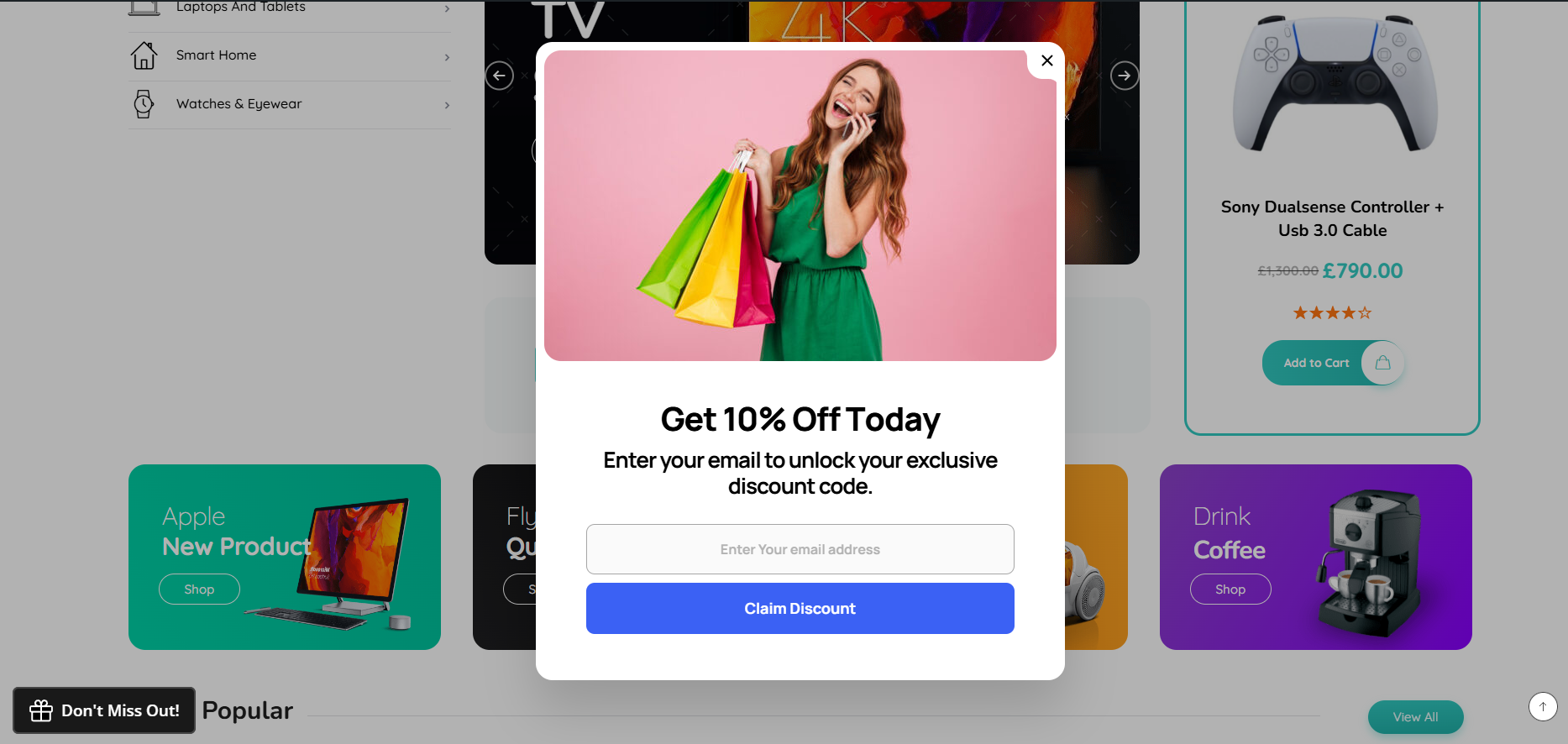
In this guide, we will explore how implementing teaser campaigns can dramatically boost popup conversion rate figures and show you step-by-step how to create a popup teaser in WordPress using Depicter.
What is a Popup Teaser? (The Smarter Popup Alternative)
If you are looking for highly effective popup alternatives, a popup teaser is the perfect solution.
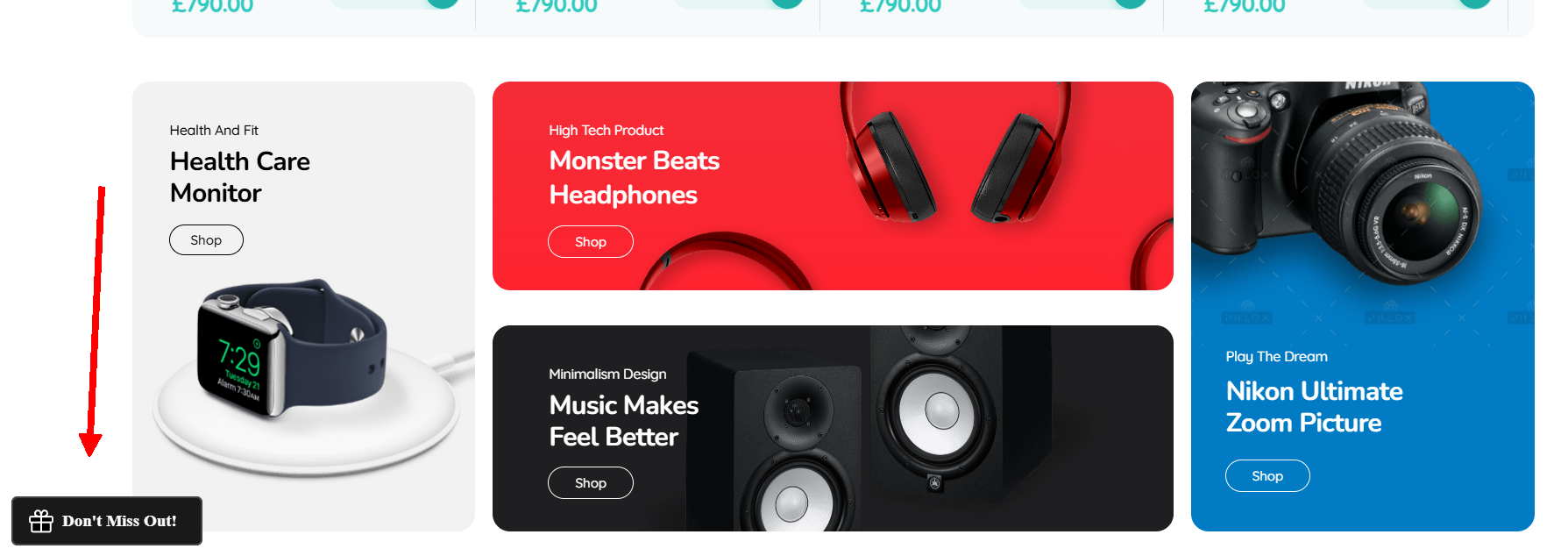
A popup teaser is a small, subtle, and persistent visual element such as a floating badge, a minimized card, or a tiny chat bubble that sits quietly in the corner of your website. It acts as a preview or a subtle hint of an offer. The crucial difference between a teaser and a traditional intrusive overlay is control: the full popup only expands when the user explicitly clicks on the teaser.
You can combine the high visibility of entry popups with the polite nature of exit-intent triggers. It stays visible to the user throughout their browsing journey without ever blocking the text or layout they came to read.
While this strategy works wonders for returning visitors and engaged readers, you might still want to make a strong first impression right when someone lands on your site. If you are looking to combine both worlds, check out our step-by-step guide on how to create a welcome popup to see how you can introduce your brand effectively before minimizing it into a polite teaser.
Overcoming “Closed-Popup Remorse”
Have you ever heard of closed-popup remorse? It is a highly common user behavior psychology pattern. Often, a visitor will instinctively close a popup the second it appears just to get it out of their way. However, a few seconds later, they realize they actually wanted that coupon code or free ebook but the popup is gone forever.
A teaser completely solves this. When a user closes a main popup built with a modern WordPress popup builder, the popup gracefully minimizes into a small teaser badge. The user can continue reading, and whenever they are ready to claim the offer, they can simply click the badge to bring it back.
Why Every WordPress Site Needs a Popup Teaser Strategy
Shifting from standard aggressive overlays to a polite teaser framework does wonders for your site’s health and performance. Here is why you should integrate them into your workflow to improve website UX:
- Curiosity-Driven Actions: Instead of forcing a message down a visitor’s throat, teasers leverage curiosity. A floating widget that reads “Click to reveal your mystery gift” invites user interaction, making the eventual popup feel like a reward rather than an interruption.
- Flawless Mobile Experience: Google penalizes websites that use intrusive interstitials on mobile devices because they block the primary content. Teasers are compact, lightweight, and completely mobile-friendly, ensuring you maintain great SEO rankings while capturing mobile leads.
- Persistent Yet Polite Visibility: Traditional popups show up once and disappear. A teaser stays on the screen subtly, giving users multiple chances to convert as they scroll through your pages and build trust with your brand.
The Best Non-Intrusive Popup Plugin for WordPress: Meet Depicter
While many know Depicter as a powerful, ultra-responsive slider builder, it has evolved into a comprehensive, world-class WordPress popup plugin as well.
Depicter is engineered to help web creators build high-converting elements without sacrificing speed or user experience. When it comes to advanced Depicter popup features, the built-in teaser functionality stands out.
With Depicter, you don’t need a separate plugin to manage your teaser campaigns and standard overlays. Its visual, drag-and-drop canvas allows you to design both the main popup and its corresponding teaser in one unified interface. You get access to smooth canvas animations, precise targeting rules, and lightweight code that keeps your site loading incredibly fast.
Best Practices for Designing High-Converting Teasers
Before we look at the technical setup, let’s look at the core design principles that make a teaser campaign successful:
Keep It Minimal and Branded
The teaser should look like an organic part of your website UI. Match its typography, colors, and border styles with your theme. It needs to be noticeable but never distracting.
Use Impactful Icons and Micro-Copy
Because space is limited, every pixel counts. Use distinct icons like a shopping bag, a gift box, or a discount percentage symbol ($%$). Pair it with punchy micro-copy:
- “Unlock Free Shipping”
- “Claim 15% Off”
- “Get Free Guide”
Show Teasers After the Popup is Closed (The Safety Net)
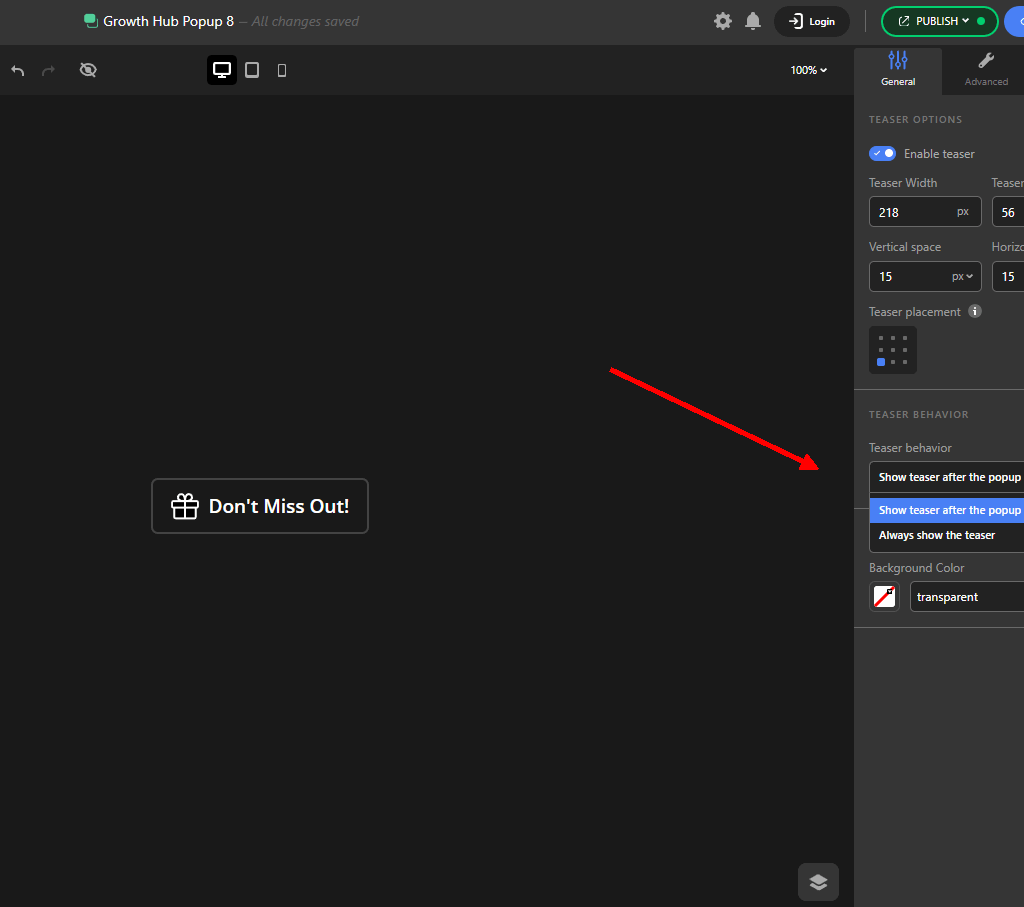
One of the most effective strategies is to use the teaser as a subtle backup plan. Instead of showing the teaser first, you can configure it to appear only after a user closes the main popup.
You can easily configure that with the Depicter teaser options.
Many visitors instinctively click the “X” button on a popup the moment it appears just to clear their screen. However, once they start reading your content, they often experience closed-popup remorse realizing they actually wanted that discount code or free ebook. By setting your teaser to activate upon closure, it shrinks into a polite, non-intrusive badge in the corner. This gives users a second chance to retrieve the offer whenever they are ready to convert, without forcing the popup back into their faces.
5 Practical Use Cases for Your Website
To give you some inspiration, here are five highly effective ways to deploy teasers across various website niches:
1. The E-Commerce Discount Badge (WooCommerce Popup Strategy)
For online store owners, a floating discount badge is pure gold. Keep a tiny teaser in the bottom-left corner that says “Unlock 10% Off”. As users browse your products, the offer stays on top of mind without breaking their shopping flow.
2. The Content Upgrade Lead Magnet
If you run a high-traffic blog, place a teaser on your long-form articles. When a user reads an extensive guide, a floating badge offering a “Download PDF Checklist” keeps your email opt-in easily accessible at any point during their reading session.
3. The Free Shipping Reminder
Unexpected shipping costs are the number one reason for abandoned shopping carts. Keep a subtle, persistent teaser banner or badge visible across your store, reminding buyers how close they are to free shipping.
4. The Exit-Intent Safety Net
When a visitor moves their cursor toward the close button of their browser window, trigger your main popup. If they close it, minimize it into a tiny “Save for later” teaser badge so they can easily retrieve it if they decide to stay.
5. Gamified Interactive Teasers
Instead of a simple text bubble, make your teaser look like a “Spin the Wheel” icon. Gamified marketing elements have massive engagement rates because users naturally want to interact with playful web elements.
How to Create a Popup Teaser in WordPress Using Depicter
Setting up a professional teaser with Depicter is incredibly straightforward. Follow this step-by-step workflow to get your campaign live in minutes:
Step 1: Open the Depicter Popup Builder
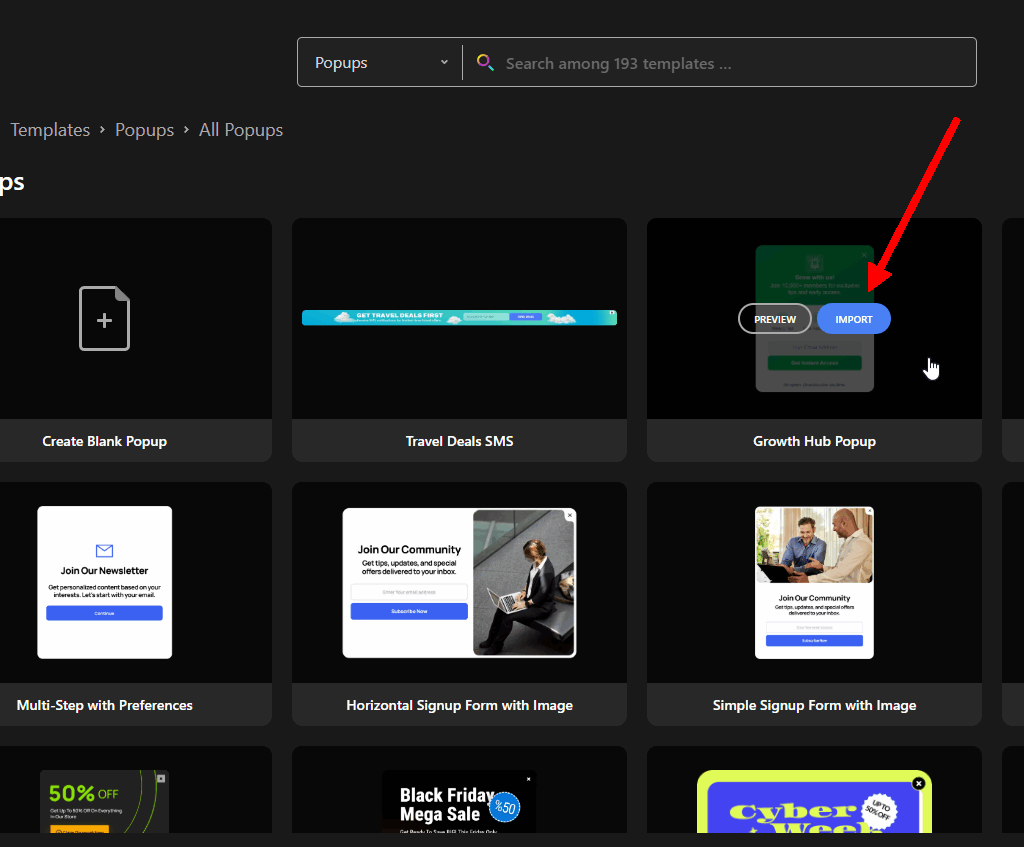
Log into your WordPress dashboard, navigate to Depicter, and click on Create New Project. Select the Popup option. You can either build your layout entirely from scratch or choose from Depicter’s extensive library of professionally pre-designed popup templates.
Step 2: Design Your Main Popup
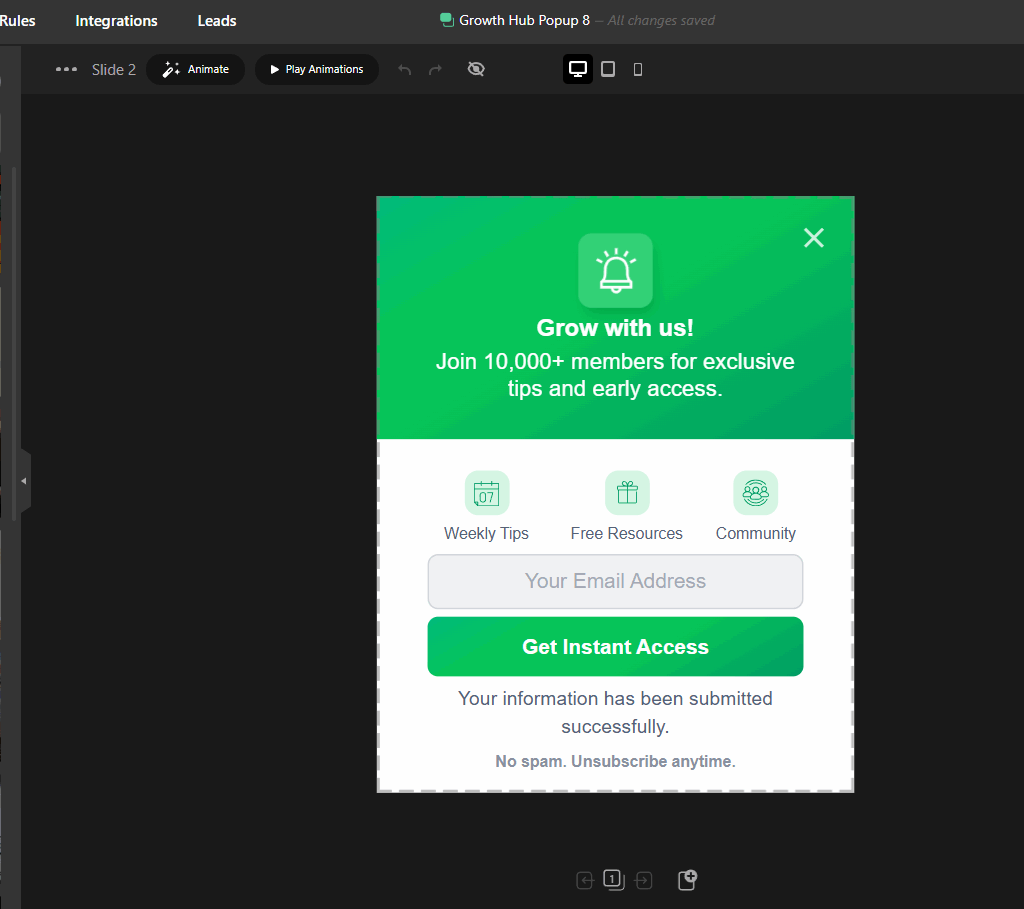
Use the drag-and-drop visual builder to add your text headings, coupon code fields, form inputs, and image graphics. This is the main window your users will see when they interact with your teaser.
Step 3: Enable and Configure the Teaser Feature
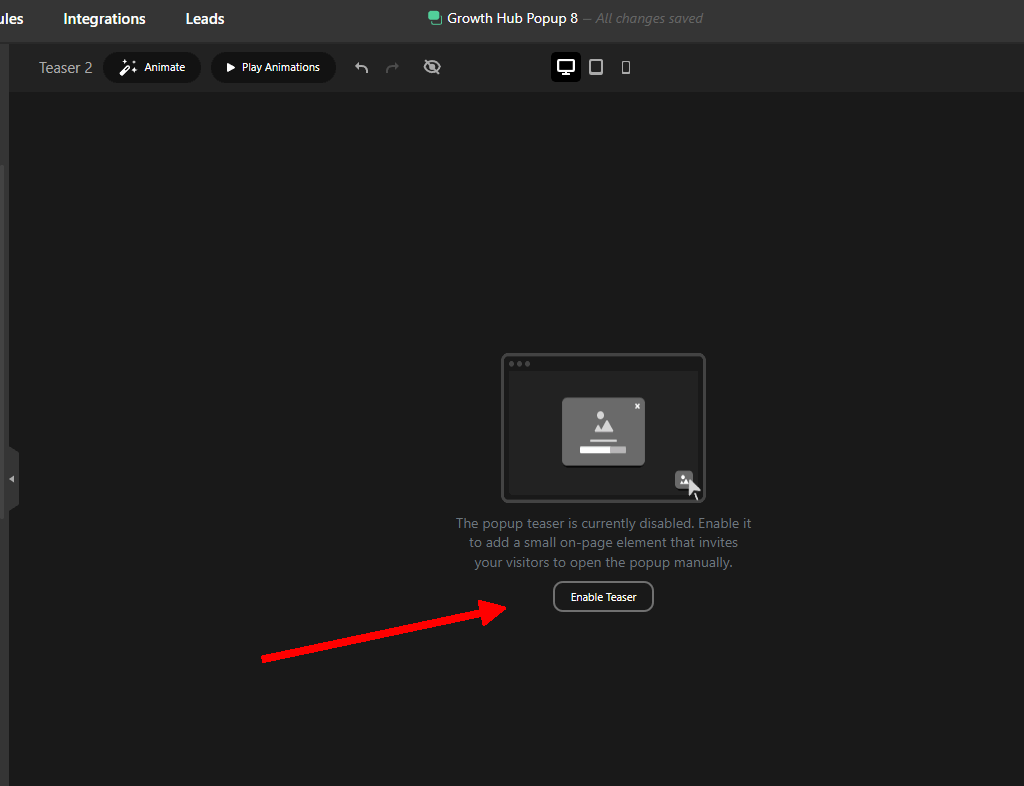
In the top menu, look for the Teaser button and click to open it, and click the Enable teaser button.
Teaser behavior: Choose whether you want the teaser to always show when the main popup opens (to build curiosity) or after the popup is closed (to prevent closed-popup remorse).
- Design Customization: Style your minimized teaser. Customize the shape, layout, colors, icons, and text to perfectly match your brand identity.
Step 4: Set Your Rules and Smart Triggers
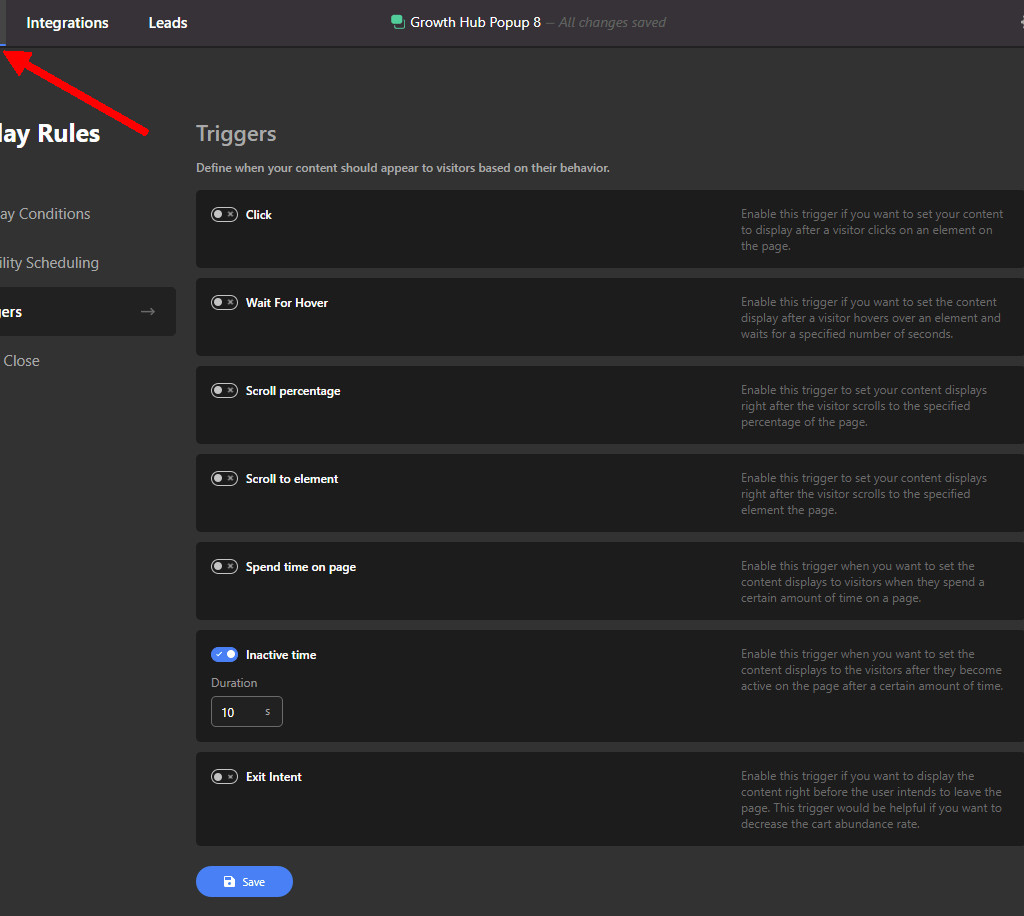
Navigate to the Publishing / Trigger Rules tab. Here, you can control exactly how your popup behaves. Set a time delay trigger (e.g., show after 5 seconds) or page scroll trigger (e.g., show after scrolling 30%). You can also restrict the popup to only show on specific blog categories or WooCommerce product pages.
Step 5: Publish Your Campaign
Preview your creation across desktop, tablet, and mobile breakpoints using Depicter’s responsive design toggles. Once everything looks flawless, hit Publish. Your sleek, non-intrusive popup teaser is now live and working for your business!
Conclusion
Maximizing your online conversions shouldn’t mean compromising your user experience. By shifting away from frustrating, old-school marketing tactics and embracing modern, non-intrusive popups, you respect your audience’s browsing space while still achieving your business milestones.
With its advanced features, lightweight framework, and intuitive interface, Depicter is an incredibly robust WordPress popup builder that handles this process effortlessly. It bridges the gap between clean web design and high-velocity marketing execution.
Ready to transform your lead generation game? Download Depicter for free today, implement your first teaser campaign, and watch your conversion rates soar while keeping your visitors happy!
Leave Comment