
Creating eye-catching motion design for websites used to be a luxury reserved for professional developers with hours of free time. You either had to write complex CSS keyframes from scratch or spend half your afternoon tweaking timeline tracks inside a plugin. Even with modern drag-and-drop tools, animating a single slide or popup can quickly become a workflow killer. Imagine having to manually click Element A, set a fade-in, click Element B, add a 200ms delay, slide in Element C, and then realize the timing looks completely out of sync.
This is exactly where the Depicter Animation Wizard changes the game. This smart feature allows you to instantly apply beautifully coordinated WordPress slider animation styles to your entire design layout with a single click.
If you are looking for a way to build highly engaging, dynamic layouts without drowning in manual settings, this guide will show you how to animate website elements effortlessly while drastically choosing to speed up web design workflow routines.

What is the Depicter Animation Wizard?
The Animation Wizard is a revolutionary, smart feature built directly into Depicter, the best WordPress Slider plugin. Instead of making you animate every single layer like text blocks, buttons, images, and shapes one by one, the Wizard acts as an automated design assistant.
When you click the “Animate” button, the engine analyzes your entire canvas, understands the hierarchy of your layers, and applies a professional motion sequence automatically. It represents a massive leap forward for automated web design tools, transforming a multi-step design task into a simple, one-click solution.
Why Manual Animation is Slowing Down Your Workflow
Before smart tools like Depicter came along, adding motion to an interactive WordPress plugin layout was a frustrating balancing act:
- The Ultimate Time Sink: Animating a standard slide with a background, two headlines, a decorative shape, and a call-to-action (CTA) button means configuring at least five different timelines. Multiply that by a 5-slide carousel, and you have wasted an hour on basic adjustments.
- The Chaotic Output Trap: Professional motion design for websites relies heavily on physics, easing curves, and logical sequencing. When non-designers try to animate elements manually, they often end up with a chaotic mess where objects fly in from random directions at jarring speeds, destroying the user experience.
- Performance Bloat: Traditional methods often load massive JavaScript libraries to handle complex timelines, slowing down your page speeds and hurting your Core Web Vitals.
The Benefits of One-Click Automated Animation
Using an intelligent system like the Depicter Animation Wizard offers massive advantages for freelancers, agency owners, and DIY WordPress users alike:
1. Flawless Structural Cohesion
The Wizard doesn’t just toss random effects onto your screen. It groups your elements into a unified sequence. Everything moves in harmony.
2. High-Velocity Project Turnaround
When you can animate an entire landing page hero section or promotional popup in three seconds instead of thirty minutes, your capacity to finish client projects skyrockets. You can focus your energy on copywriting and strategy rather than pixel-pushing.
3. Built-In Performance Optimization
Depicter is widely recognized not only as a slider plugin but as the best WordPress Popup plugin for speed because its animation engine is built on lightweight, modern web standards. The Wizard generates clean, highly optimized CSS and hardware-accelerated code, ensuring your animations run at a buttery-smooth 60 frames per second on any device.
How to Animate Website Elements in Seconds (Step-by-Step)
Ready to see it in action? Follow this simple workflow to bring your static layouts to life using Depicter animation wizard presets:
Step 1: Arrange Your Static Content
Open your project inside Depicter and design your layout exactly how you want it to look at rest. Add your background graphic, type out your headings, insert your product shots, and position your buttons.
Step 2: Launch the Wizard
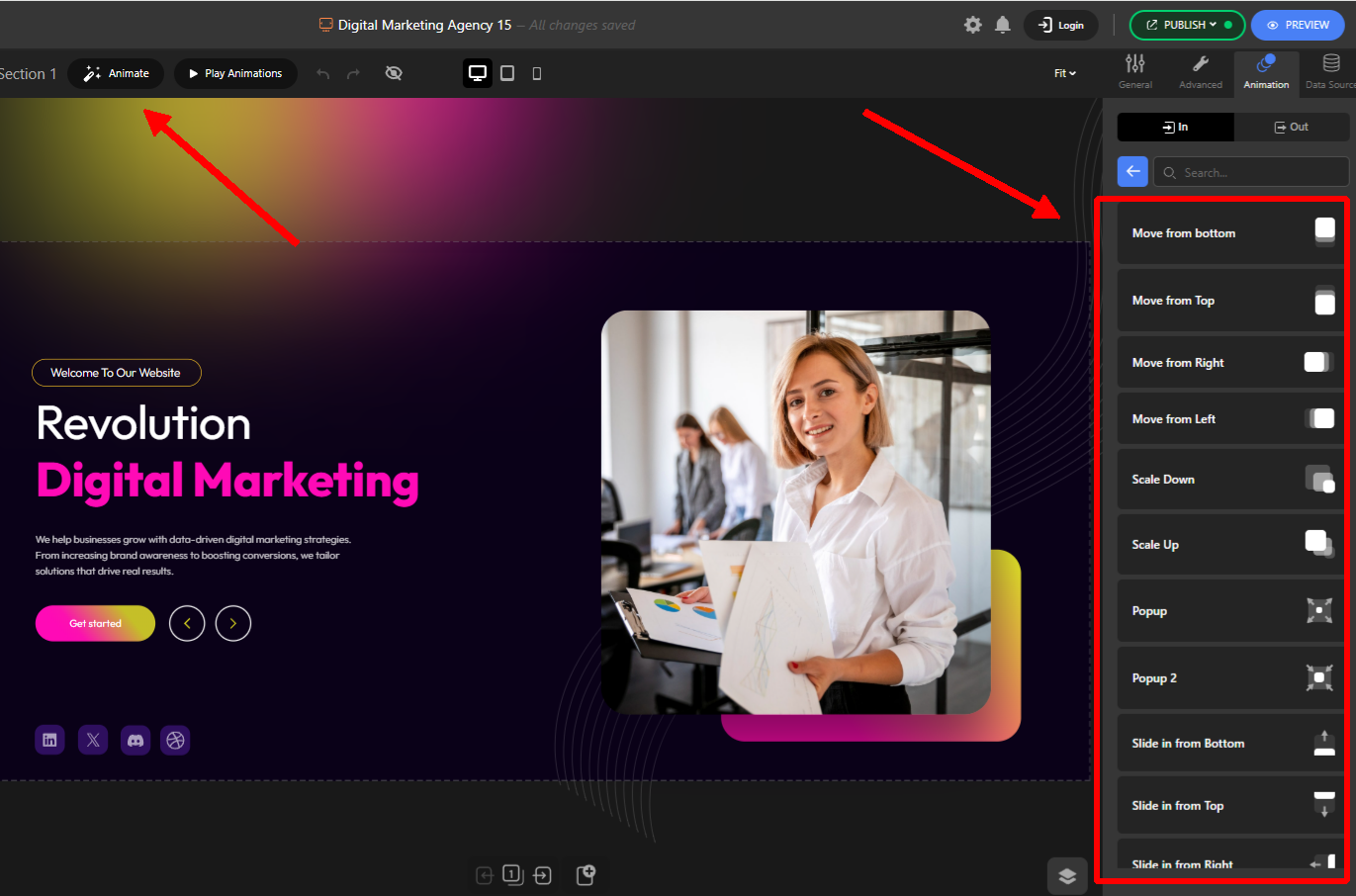
Look at the top configuration panel or layer menu and locate the magic Animate button. Clicking this button opens up the dedicated Animation options on the right-side panel.
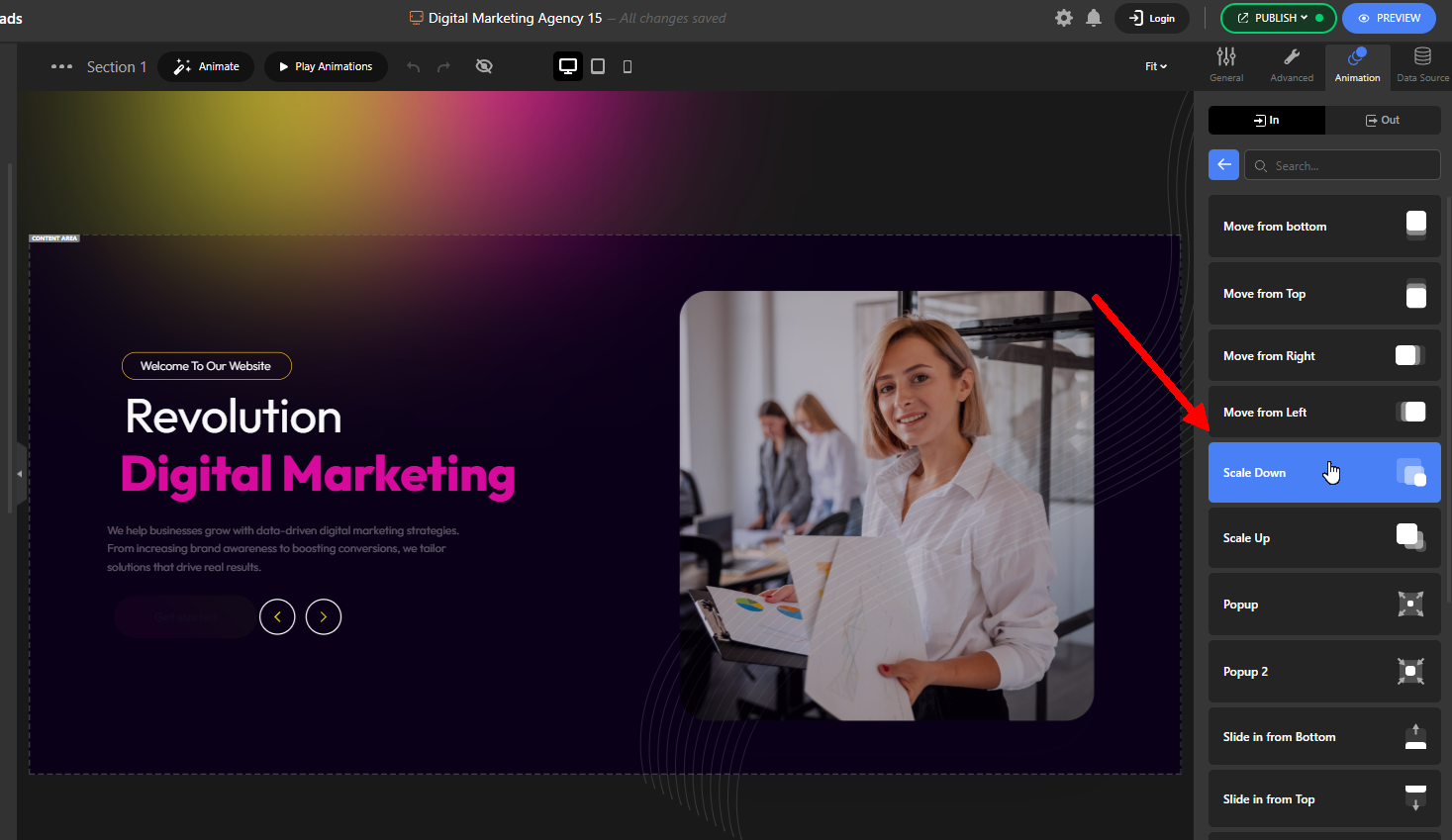
Step 3: Select Your Animation Vibe
Hover on any of the pre-defined animation sets to see the effect on your layers in real time inside the editor.
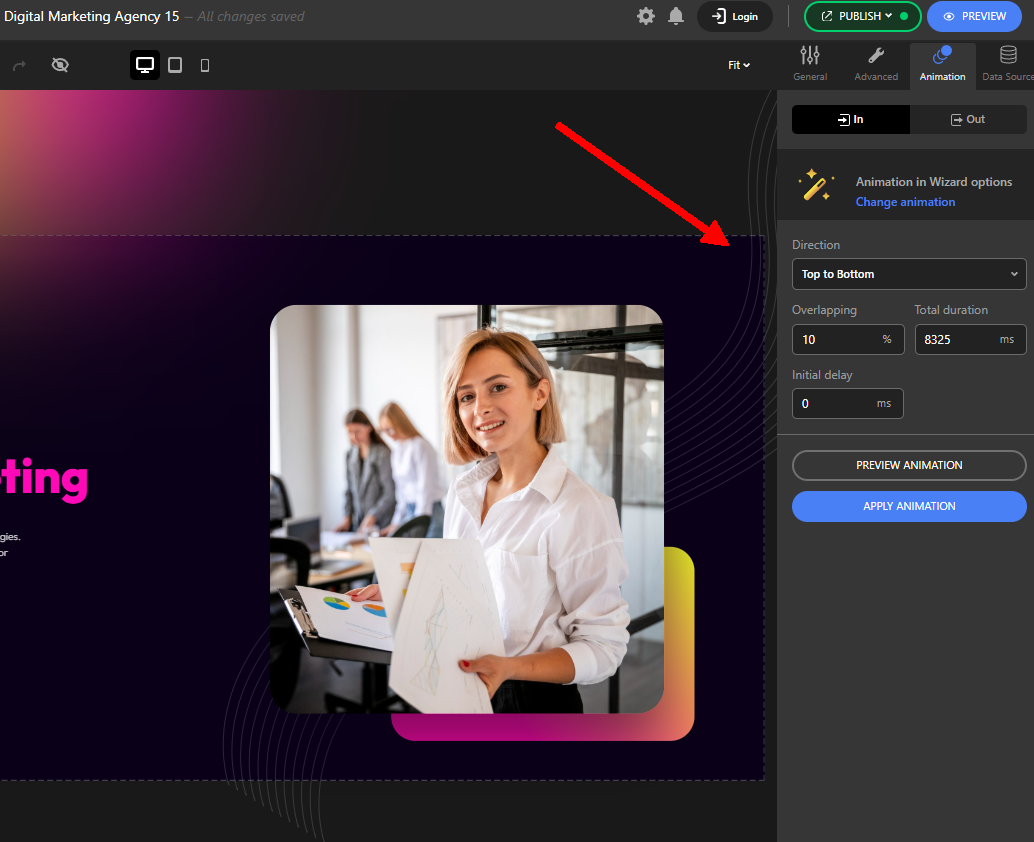
Step 4: Customize Your Global Variables
Once you pick a baseline style, you can use the intuitive adjustments to fine-tune the behavior across the entire slide:
Step 5: Preview and Publish
Hit the preview button to see your masterpiece flash to life. If you love the result, close the wizard and publish your project. Depicter takes care of the rest behind the scenes.
Best Practices for Balanced Website Motion
While the Wizard makes adding motion incredibly simple, keep these strategic principles in mind to maintain a great user experience:
- Let Content Dictate the Motion: Animation should always serve a functional purpose, guiding the reader’s eyes directly toward your most important information or CTA. Don’t let elements move so fast or wildly that they distract from the actual copy.
- Respect Responsive Breakpoints: A grand, sweeping animation that looks epic on a 27-inch desktop monitor can easily feel overwhelming or slow down older hardware on mobile viewports. Always test your animations across all screen sizes.
- Keep Eased Intros Subtle: Fast, clean entrance animations with a slight bounce look modern and snappy. Avoid long, drawn-out fade-ins that force your visitors to sit and wait for text to become readable.
Conclusion
You don’t need a degree in motion graphics or an expensive budget to build a highly interactive, modern website. By moving away from tedious manual keyframing and embracing smart automation, you can create professional-grade visual sequences effortlessly.
The Depicter Animation Wizard strikes the ideal balance between high-end design aesthetics and hyper-efficient execution. It solidifies Depicter’s position as a truly innovative WordPress slider animation plugin that works hard to save you time.
Ready to see how fast you can transform your static web pages? Download Depicter today, fire up the wizard, and watch your layouts come alive with a single click!
Leave Comment