
If you’ve ever tried adding a slider to your Shopify store, you’ve probably faced at least one of these issues: slow loading speed, limited customization, or poor mobile performance.
Most traditional slider apps solve one problem but create another. You either get decent design options with heavy scripts or fast performance with very limited flexibility.
In 2026, that trade-off is no longer acceptable. Store owners need tools that combine speed, design control, and conversion optimization.
In this guide, we’re going to find the best Shopify slider app. We’ll break down what makes a great solution and why one option stands out from the rest.
Quick Comparison of Top Shopify Slider Apps (2026)
There are several Shopify apps that offer slider functionality, but most of them are built around very specific use cases rather than being complete design solutions.
For example, TA Banner Slider, Sales Pop up focuses heavily on promotional elements. It allows you to create rotating banner sliders and popups. It’s especially useful if your main goal is marketing campaigns, urgency (via timers), and announcement bars rather than building flexible layouts.
Another option is GG Product Page Image Slider, which is designed specifically for product pages. It replaces the default gallery with a slider that supports image zoom, video slides, variant-based images, and carousel layouts. This makes it a strong choice if you want to improve how products are displayed, but it’s limited to product media rather than full-page design.
Then there’s Reputon Testimonials Slider, which serves a completely different purpose. Instead of traditional sliders, it focuses on displaying customer reviews and social proof in slider or carousel formats. You can embed photo reviews and other items from platforms like Amazon or Google, making it useful for trust-building rather than visual design.
What’s important to notice here is that each of these apps solves a narrow problem:
TA Banner Slider: promotions and popups
GG Product Page Image Slider: product image galleries and Shopify carousel displays
Reputon Testimonials Slider: social proof and reviews
They are all useful in their own context, but none of them is built as a complete solution for creating banners, sliders, Shopify hero sections, and Shopify carousel layouts across your entire store.
This gap is exactly where a more flexible tool becomes necessary.
Why Depicter Is the Best Shopify Slider App
Depicter is designed as a next-generation visual builder rather than just a slider tool.
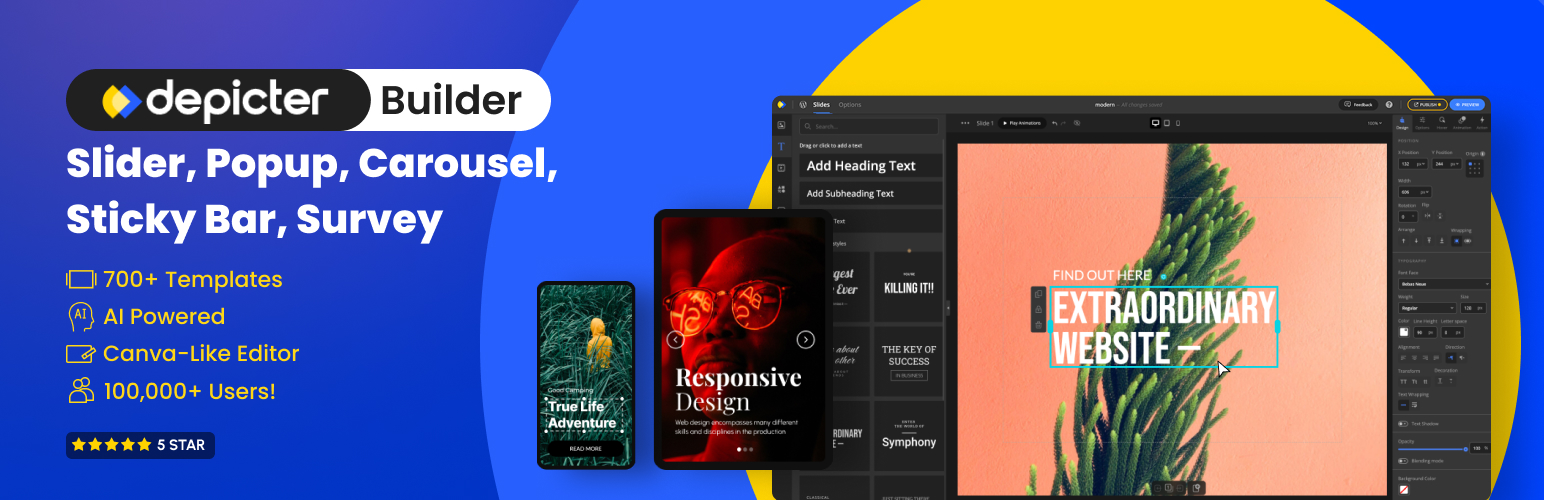
Instead of limiting you to basic slides, it allows you to create everything from a Shopify banner slider to a fully customized Shopify hero section, full-width Shopify slider layouts, and even advanced Shopify carousel designs, all while keeping performance in check.
Performance and Speed
Performance is one of the main concerns with sliders, but it doesn’t have to be a problem. With the right approach, you can create a Shopify slider without slowing site performance.
Speed depends on multiple factors such as how assets are loaded, how images are optimized, and how efficiently the builder renders content. Depicter is designed to keep resource usage minimal, avoiding heavy scripts and unnecessary requests to maintain fast load times.
A big part of performance comes down to best practices. Using properly sized images, modern formats like WebP, and compression helps reduce load without sacrificing quality.
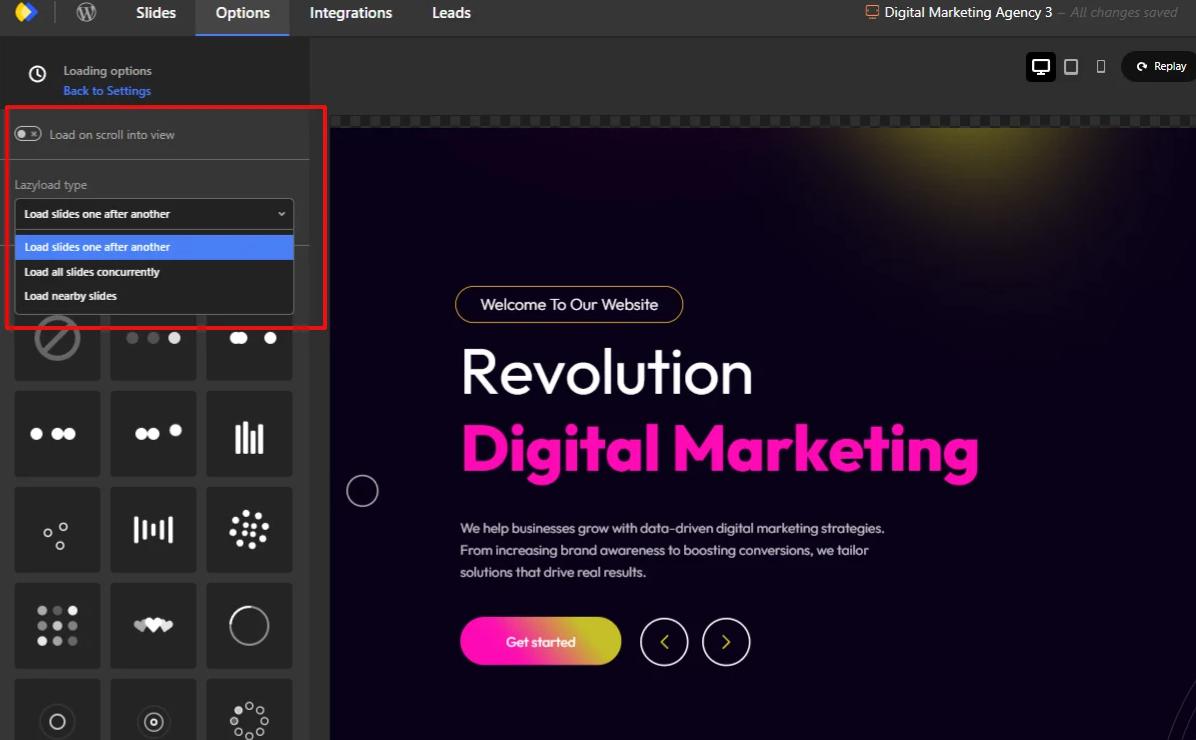
Lazy loading is also essential. Only the first slide loads immediately, while off-screen slides are deferred. This reduces initial page weight and improves overall performance.
Animations should be used carefully. Simple transitions like fades or slides are more efficient, while heavy layered animations can slow things down.
By combining these techniques, Depicter delivers a balance between design flexibility and speed, making it a strong choice for performance-focused Shopify stores.
Advanced Visual Builder
Depicter goes far beyond what you would expect from a typical Shopify image slider app.
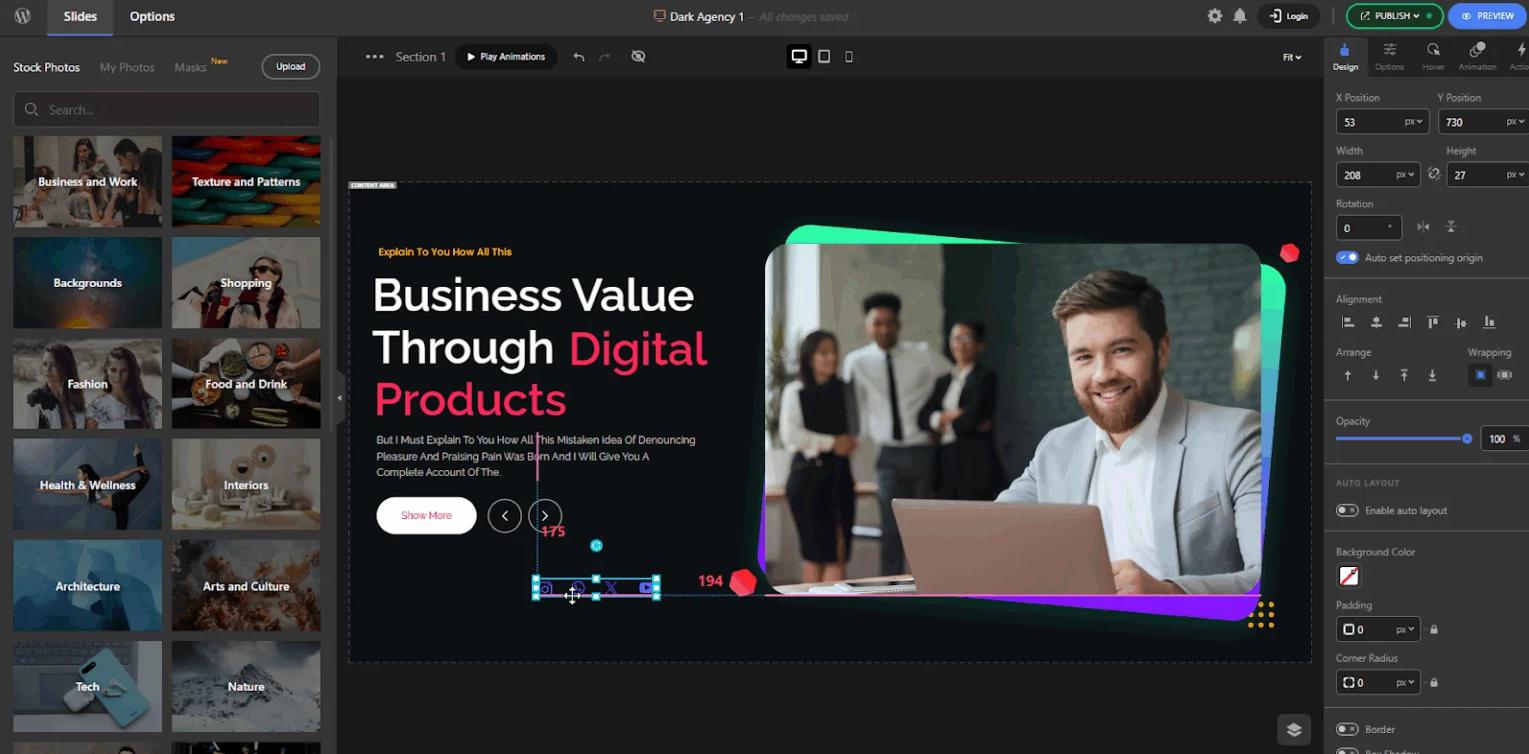
Instead of limiting you to predefined layouts, it gives you full control through a completely drag-and-drop editor. This makes it easy for beginners to create professional designs, while still offering the flexibility that advanced users need.
You can build:
- A fully customized Shopify hero section
- Interactive Shopify carousel layouts
- High-converting Shopify banner slider designs
- And much more
The Depicter’s Canva-like editor allows you to place elements freely in any structure you want, without being restricted to rigid templates. At the same time, it includes powerful features that make the design process smoother and more precise.
For example, features like snapping, resize, and rotate help you align and adjust elements easily. You can also group multiple elements together, which unlocks several important advantages. It allows you to move and resize multiple elements at once, keeps their relative positions consistent, and makes complex layouts much easier to manage.
One of the most powerful capabilities is Auto Layout. By enabling it, you can create structured layouts based on flex and grid systems, making your designs more responsive and scalable without extra effort.
Beyond features, the overall editor experience feels modern and intuitive. The layout of the canvas, asset panel, settings, and controls is designed to reduce friction and help you focus on building. Even small details like the right-click menu and quick access options contribute to a smoother workflow.
The result is a builder that doesn’t just help you create sliders, but enables you to design complete sections, including Shopify announcement bar layouts, promotional banners, and interactive Shopify carousel components with precision and ease.
Fully Responsive Design
Responsive design is one of the most critical aspects of any modern slider or visual builder. It’s not just about making elements smaller on mobile. It’s about having full control over how your design behaves and looks across different screen sizes.
Depicter is built to function as a fully responsive Shopify slider app, giving you precise control over layouts, elements, and behavior on every device.
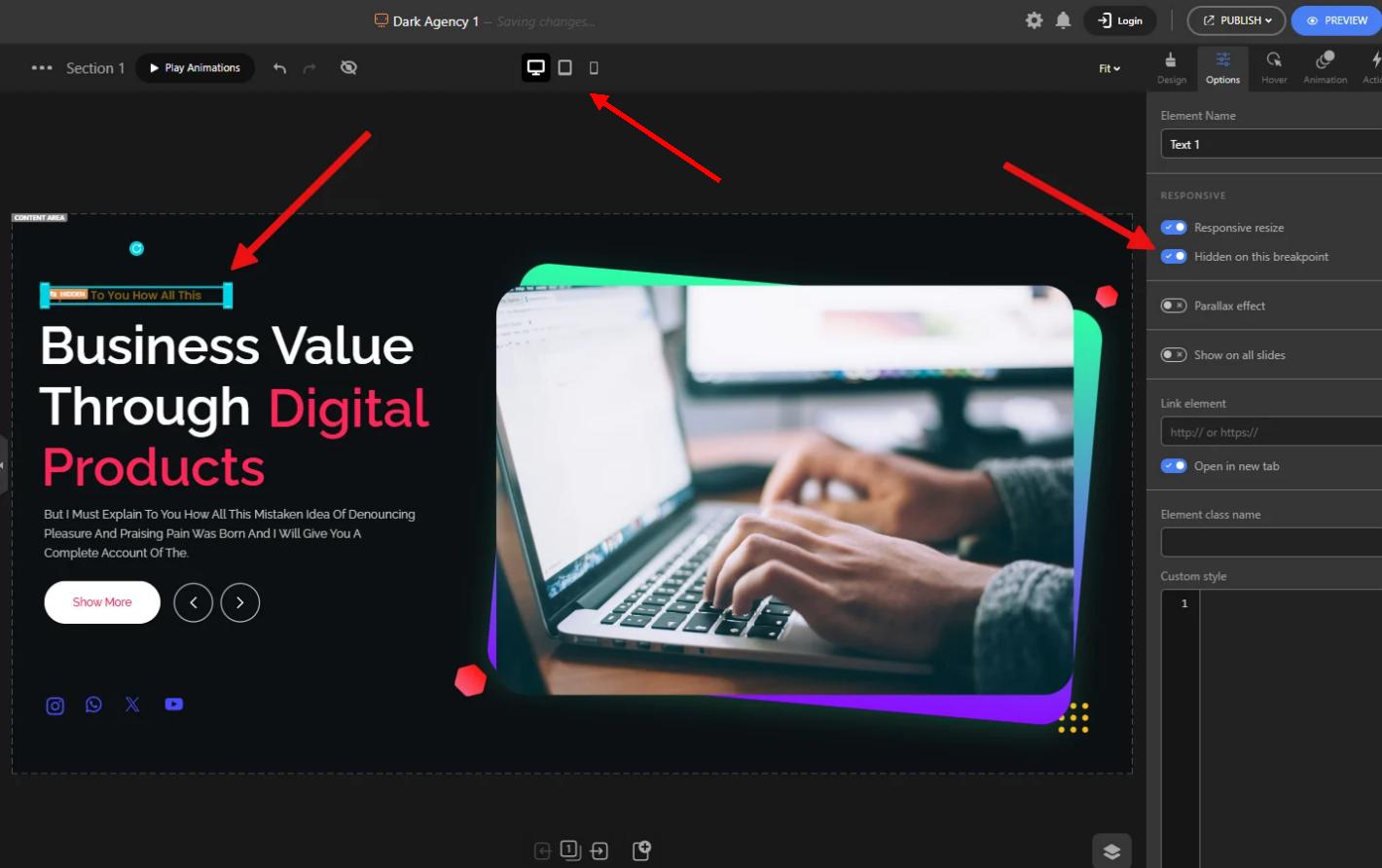
Instead of forcing a single layout to adapt to all screen sizes, Depicter allows you to create completely independent designs for each responsive mode. This means your mobile, tablet, and desktop versions can each have their own structure, layout, and visual hierarchy.
You can adjust every detail per device, including:
- Element size, position, and spacing
- Colors and styling
- Rotation and alignment
- Background images for each slide
This level of control makes it possible to truly optimize the experience for each screen size, rather than relying on automatic scaling.
Another powerful feature is the ability to manage how elements behave when the slider resizes. You can choose between responsive resize behavior or fixed positioning, depending on your design needs.
Depicter also allows you to customize the width and height of individual slides for different responsive modes, making it ideal for building mobile-optimized Shopify hero sections and compact Shopify carousel layouts.
Templates
Ready-made templates play a major role in speeding up the design process. They allow you to skip building layouts from scratch and move directly into customization.
Depicter offers a library of 700+ Shopify slider templates, covering a wide range of use cases and design styles. These templates are organized into categories, making it easy to create anything from a Shopify banner slider to a Shopify hero section or promotional campaign.
The collection includes templates for product showcases, seasonal promotions, landing sections, Shopify announcement bar designs, and more.
Another important advantage is that the template library is continuously updated, ensuring access to modern and relevant layouts.
When You Should and Should Not Use a Slider
Sliders can be a powerful tool when used correctly.
They work best for highlighting promotions, showcasing multiple products, or creating engaging Shopify hero section experiences. A well-designed Shopify carousel or banner can guide users and improve engagement.
However, overusing sliders or adding too many slides can reduce clarity and hurt conversions. Poorly optimized sliders can also slow down your site.
That’s why choosing a fast and efficient Shopify slider solution is essential.
Final Verdict
Choosing the best Shopify slider app in 2026 comes down to what you actually need: a simple slideshow or a complete visual solution.
Many apps can handle basic slider functionality. But as your store grows, you’ll need more flexibility to build banners, Shopify carousel sections, and full Shopify hero section layouts while keeping performance optimized.
This is where Depicter stands out.
It combines a modern drag-and-drop builder, a large and constantly updated template library, advanced responsive controls, and strong performance optimization. Instead of relying on multiple tools, it allows you to manage sliders, banners, Shopify announcement bar elements, and more in one place.
If your goal is to create high-quality visuals without slowing down your store, Depicter is one of the most complete solutions available today.
FAQs
What is the best Shopify slider app
The best app depends on your needs, but tools that balance performance, flexibility, and ease of use tend to deliver the best results.
Do sliders slow down Shopify stores
They can, especially if they are not optimized. Using lightweight tools and best practices helps prevent performance issues.
What is a Shopify banner slider
A Shopify banner slider is a rotating section that displays promotional content, images, or messages on your store.
What is the difference between a slider and a carousel
A Shopify slider typically shows one slide at a time, while a Shopify carousel can display multiple items and allows horizontal scrolling.
Do I need coding skills to add a slider in Shopify
No, most modern tools use drag-and-drop editors, making it easy to create and publish sliders without coding.
Leave Comment